


Before you leave...
Take 20% off your first order
20% off
Enter the code below at checkout to get 20% off your first order

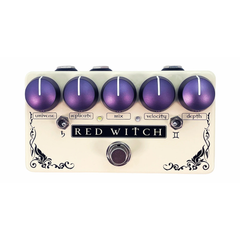
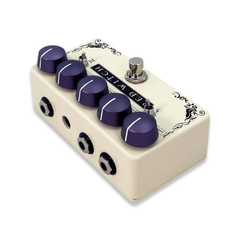

Immeasurably versatile, the Binary Star allows you access to a vast range of analog flavored sounds, from straightforward delays (Slap Back to long repeats) and modulation effects like chorus, and vibrato, through to insane pitch shifted repeats and ultra fast pitch shifted vibrato repeats.
The Binary Star can be used in mono or stereo mode, where the stereo mode splits the wet and dry signals into two outputs which can be run into separate amplifiers.
Featuring 5 dials, two toggle switches and one foot switch, the Binary Star allows you to dial a near infinite number of sounds from it’s multidimensional heart.
The Controls:
Universe : This controls the delay time. Unlike standard delay times the universe control increases delay time as the control is turned clockwise, but begins to reduce delay time in the last stages of it’s sweep. Like the classic analog delays of old, as you increase the delay time you will hear background artifacts in the sound. You’re pushing the engine. But it’s ok. The Binary Star’s warp drive can take it. No need for alarm.
Replicate: Used to determine the number of repeats in longer delay settings or the resonance, in shorted delay settings.
Mix: Allows you to choose any blend of Dry, Wet and Dry and 100% Wet.
SHIPPING POLICY
Music Corner North has a minimum $15 shipping on all orders within South Australia. Due to the unpredictable nature of shipping goods interstate, we do not offer flat rate shipping when purchasing from outside SA. Instead we like to assess on a case-by-case scenario to best offer you the fastest shipping option within your budget. To learn more about our shipping policy and pricing quotes when shipping interstate please give us a call on (08) 8258 9366 for more information before placing your order.

Thanks for subscribing!
This email has been registered!
Take 20% off your first order
Enter the code below at checkout to get 20% off your first order
You have copied the placement for the Product Page.
Go back to the App Embeds section, and in the Paypal Advanced Settings, paste the copied value into the Product Page field and click the 'Save' button in the top right corner.